When Three Kubernetes Pods Try to Run One Database Migration
Updated · originally #kubernetes#migrations10 min read
This startup command looked fine while our application had one replica:
prisma migrate deploy && node server.jsThen we scaled the Deployment to three pods.
All three pods started together. All three ran the migration command. Prisma used a PostgreSQL advisory lock to protect the migration, so the database was not corrupted, but the losing pods waited for the lock and eventually timed out. Kubernetes saw failed containers, restarted them, and filled the rollout logs with errors.
One pod was doing useful work. The other two were turning expected contention into application failures.
The clean solution is a migration Job that runs before the Deployment. Our release platform could only start one application workload, so we used a small PostgreSQL-backed coordinator instead.
This post shows the complete pattern.
The problem in one picture
A Deployment creates copies of a long-running process. A database migration is one-shot work.
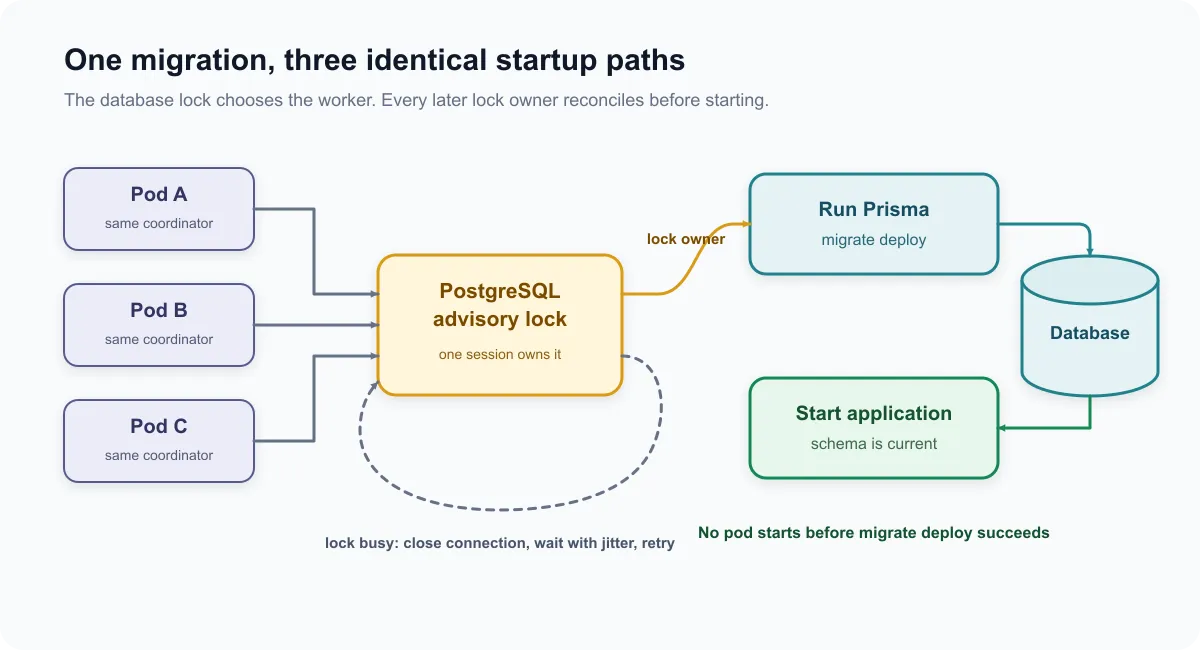
The coordinator gives every pod the same startup protocol:
- Try to acquire one application-specific advisory lock.
- If the lock is busy, close the connection, wait with jitter, and try again.
- If the lock is acquired, run
prisma migrate deploy. - Release the lock and start the application.
Every pod runs the migration command after acquiring the lock. For the first pod it applies pending migrations. For later pods it is a no-op. This matters because a released lock only proves that the previous database session ended. It does not prove the previous migration succeeded.
Use a Job when your platform supports one
Before adding coordination code, check whether the delivery system can run an ordered pre-deployment Job.
A Job is the better default because it gives the migration its own status, logs, image and database credentials. The application Deployment does not need schema-changing permissions, and a failed migration stops the rollout at the correct boundary.
The coordinator below is for the awkward case where the platform can only deploy the application workload. That was our constraint.
Add the coordinator
The application already contained Prisma. The coordinator only needed the PostgreSQL client:
npm install pgCreate prisma/migration-coordinator.mjs:
import { spawn } from "node:child_process";
import { createHash } from "node:crypto";
import { fileURLToPath } from "node:url";
import pg from "pg";

const { Client } = pg;

const connectionString = process.env.DIRECT_DATABASE_URL;
const lockName = process.env.MIGRATION_LOCK_NAME ?? "web:public:prisma-migrations";
const lockId = createHash("sha256")
  .update(lockName)
  .digest()
  .readBigInt64BE(0)
  .toString();
const waitTimeoutMs = Number(process.env.MIGRATION_WAIT_TIMEOUT_MS ?? "300000");
const retryDelayMs = Number(process.env.MIGRATION_RETRY_DELAY_MS ?? "2000");
const prismaCli = fileURLToPath(new URL("../node_modules/.bin/prisma", import.meta.url));

let activePrismaChild = null;
let shutdownSignal = null;

if (!connectionString) {
  throw new Error("DIRECT_DATABASE_URL is required");
}

function requestShutdown(signal) {
  if (shutdownSignal) {
    return;
  }

  shutdownSignal = signal;
  console.log(`received ${signal}; stopping migration coordination`);

  if (activePrismaChild && activePrismaChild.exitCode === null) {
    activePrismaChild.kill(signal);
  }
}

process.on("SIGTERM", () => requestShutdown("SIGTERM"));
process.on("SIGINT", () => requestShutdown("SIGINT"));

function throwIfShuttingDown() {
  if (shutdownSignal) {
    throw new Error(`migration coordination interrupted by ${shutdownSignal}`);
  }
}

function sleep(ms) {
  return new Promise((resolve) => setTimeout(resolve, ms));
}

function runPrismaMigrateDeploy() {
  return new Promise((resolve, reject) => {
    const child = spawn(prismaCli, ["migrate", "deploy"], {
      stdio: "inherit",
      env: {
        ...process.env,
        DATABASE_URL: connectionString,
      },
    });

    activePrismaChild = child;

    const clearActiveChild = () => {
      if (activePrismaChild === child) {
        activePrismaChild = null;
      }
    };

    child.once("error", (error) => {
      clearActiveChild();
      reject(error);
    });

    child.once("exit", (code, signal) => {
      clearActiveChild();

      if (code === 0 && !shutdownSignal) {
        resolve();
        return;
      }

      if (signal) {
        reject(new Error(`prisma migrate deploy terminated by ${signal}`));
        return;
      }

      if (shutdownSignal) {
        reject(new Error(`prisma migrate deploy interrupted by ${shutdownSignal}`));
        return;
      }

      reject(new Error(`prisma migrate deploy exited with code ${code}`));
    });

    if (shutdownSignal && child.exitCode === null) {
      child.kill(shutdownSignal);
    }
  });
}

const deadline = Date.now() + waitTimeoutMs;
let migrationComplete = false;

while (!migrationComplete) {
  throwIfShuttingDown();

  const client = new Client({
    connectionString,
    connectionTimeoutMillis: 10_000,
  });

  let acquired = false;

  try {
    await client.connect();
    throwIfShuttingDown();

    const result = await client.query(
      "SELECT pg_try_advisory_lock($1::bigint) AS acquired",
      [lockId],
    );
    acquired = result.rows[0].acquired === true;

    if (acquired) {
      throwIfShuttingDown();
      console.log("migration lock acquired");
      await runPrismaMigrateDeploy();
      throwIfShuttingDown();
      console.log("database migrations are current");
      migrationComplete = true;
    }
  } finally {
    if (acquired) {
      await client
        .query("SELECT pg_advisory_unlock($1::bigint)", [lockId])
        .catch((error) => console.error("failed to release migration lock", error));
    }

    await client.end().catch(() => {});
  }

  if (migrationComplete) {
    break;
  }

  throwIfShuttingDown();

  if (Date.now() >= deadline) {
    throw new Error("timed out waiting for the migration lock");
  }

  const jitterMs = Math.floor(Math.random() * 500);
  console.log("migration lock busy; waiting before retry");
  await sleep(retryDelayMs + jitterMs);
}- Define the coordination boundary. Read the direct database URL, derive a stable advisory-lock ID, set the retry budget, and resolve the Prisma CLI.
- Make shutdown explicit. Record
SIGTERMorSIGINT, forward it to an active Prisma child, and refuse to start new work once termination begins. - Keep migration failure fatal. Run
prisma migrate deployas a child process, wait for it to exit, and reject on errors, signals, or a non-zero status. - Try the lock without blocking. Open a database connection for this attempt and use
pg_try_advisory_lockso a busy lock returns immediately. - Reconcile while holding the lock. The lock owner runs the migration, then the
finallyblock releases the session lock only after the Prisma child has exited. - Bound and jitter retries. If migration is not complete, stop on termination, enforce the overall deadline, and wait with jitter before trying again.
There are five details worth keeping:
pg_try_advisory_lockreturns immediately instead of keeping a waiting connection open.- The same database connection stays open while the Prisma subprocess runs. Session-level advisory locks belong to the connection that acquired them.
SIGTERMandSIGINTstop new coordination work and are forwarded to an active Prisma child.- Every lock owner runs
migrate deploy. Already-applied migrations make it a no-op. - A failed or interrupted migration rejects the script, so the application does not start against an unknown schema.
Use a direct PostgreSQL connection for DIRECT_DATABASE_URL. Transaction-mode poolers do not preserve session state, so they are the wrong boundary for a session-level advisory lock.
The lock name is not a secret, but it must be stable. The script hashes the readable name into the signed 64-bit integer PostgreSQL expects. Every revision of this application should use the same name for the same database and schema. Different applications sharing a database should use different names.
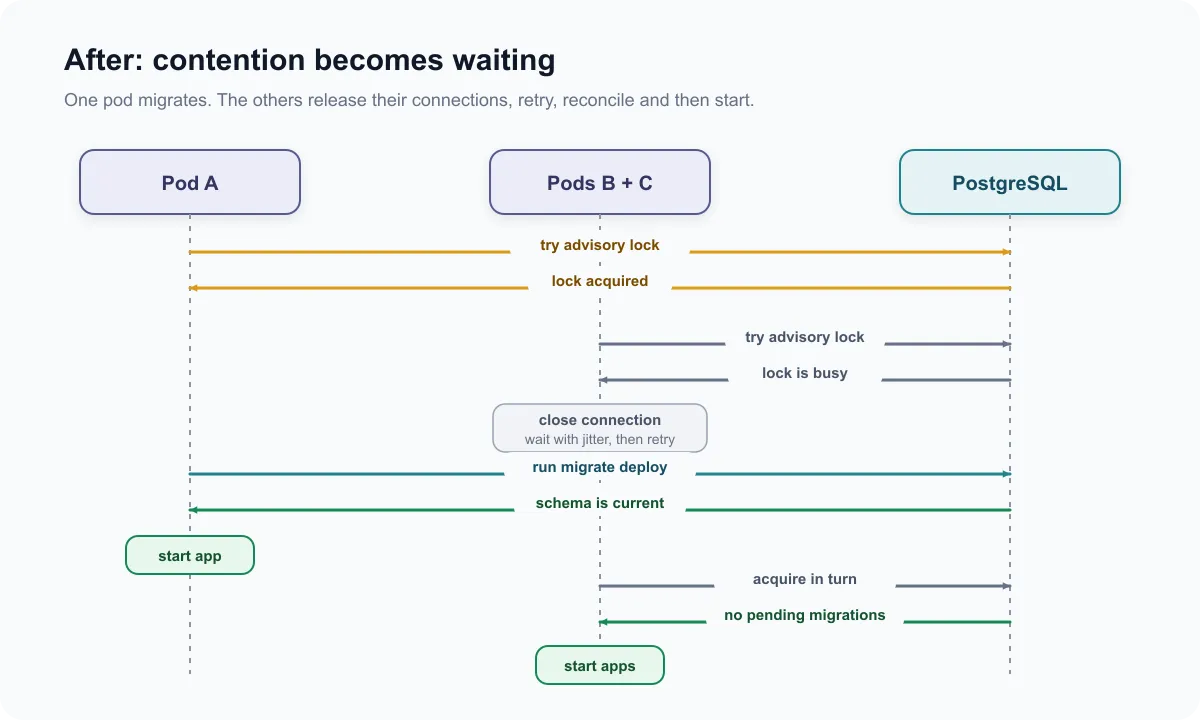
After adding the coordinator, expected contention becomes an ordinary waiting path:
Run it before the server
Update the container command so the server starts only after coordination succeeds:
apiVersion: apps/v1
kind: Deployment
metadata:
  name: web
spec:
  replicas: 3
  selector:
    matchLabels:
      app: web
  template:
    metadata:
      labels:
        app: web
    spec:
      containers:
        - name: web
          image: registry.example.com/web:abc123
          ports:
            - name: http
              containerPort: 3000
          command: ["sh", "-c"]
          args:
            - |
              child_pid=""
              termination_status=0

              forward_term() {
                termination_status=143
                if [ -n "$child_pid" ]; then
                  kill -TERM "$child_pid" 2>/dev/null || true
                else
                  exit "$termination_status"
                fi
              }

              forward_int() {
                termination_status=130
                if [ -n "$child_pid" ]; then
                  kill -INT "$child_pid" 2>/dev/null || true
                else
                  exit "$termination_status"
                fi
              }

              trap forward_term TERM
              trap forward_int INT

              node prisma/migration-coordinator.mjs &
              child_pid=$!

              wait "$child_pid"
              status=$?

              while kill -0 "$child_pid" 2>/dev/null; do
                wait "$child_pid"
                status=$?
              done

              child_pid=""

              if [ "$termination_status" -ne 0 ]; then
                exit "$termination_status"
              fi

              if [ "$status" -ne 0 ]; then
                exit "$status"
              fi

              exec node server.js
          env:
            - name: DIRECT_DATABASE_URL
              valueFrom:
                secretKeyRef:
                  name: web-database
                  key: direct-url
            - name: MIGRATION_LOCK_NAME
              value: "web:public:prisma-migrations"
            - name: MIGRATION_WAIT_TIMEOUT_MS
              value: "300000"
          startupProbe:
            httpGet:
              path: /health/startup
              port: 3000
            periodSeconds: 5
            failureThreshold: 72
          readinessProbe:
            httpGet:
              path: /health/ready
              port: 3000
            periodSeconds: 5
During migration the shell is still PID 1, so it must not swallow Kubernetes termination signals. The wrapper traps SIGTERM and SIGINT, forwards them to the coordinator, and waits for the coordinator to exit. The coordinator forwards the signal to Prisma and keeps its advisory-lock session open until that child exits. After a successful migration, exec replaces the shell with the application so the server receives later signals directly as PID 1.
Set the pod’s terminationGracePeriodSeconds from the longest migration or rollback you expect to shut down safely. Treat that grace period as cleanup time, not as a correctness guarantee.
The coordinator calls the Prisma binary already installed in the image. Keep the Prisma CLI in the production image rather than downloading it during startup. If your image uses a different project layout, adjust prismaCli to match it.
The startup probe allows six minutes for lock waiting, migration and application startup. Set that budget from your slowest expected migration rather than copying this number. Readiness still decides when the running pod can receive traffic.
What happens during a rollout
With three new pods, the rollout now looks like this:
pod-a  migration lock acquired
pod-b  migration lock busy; waiting before retry
pod-c  migration lock busy; waiting before retry

pod-a  database migrations are current
pod-a  application starts

pod-b  migration lock acquired
pod-b  no pending migrations to apply
pod-b  application starts

pod-c  migration lock acquired
pod-c  no pending migrations to apply
pod-c  application starts
Expected contention is logged as waiting, not as a migration failure. If the winning pod disappears, PostgreSQL releases its session lock when the connection closes. Another pod acquires the lock and runs migrate deploy again.
That recovery rule also covers the awkward boundary where the migration commits but the coordinator dies before it can log success. The next lock owner reconciles against Prisma’s migration history and gets a no-op for work that already committed. There is no separate coordinator success marker to trust.
Graceful shutdown only improves the normal termination path. SIGKILL, node loss, network failure or database failover can still remove the coordinator without giving it time to clean up. Correctness still comes from reconciliation after the next lock acquisition.
This has the same shape as the shared-state problem in Scaling an Agentic Coding SDK: What Concurrency Actually Costs. Sequential execution had hidden an ownership problem. Adding replicas made it visible.
The lock does not make breaking migrations safe
The advisory lock serialises migration commands. It does not stop old pods from serving traffic while a new pod changes the schema.
Rolling deployments still need expand-and-contract migrations:
- Add the new schema in a backward-compatible form.
- Deploy code that works with both representations.
- Backfill data if required.
- Switch reads and writes.
- Remove the old schema after old pods are gone.
I covered the same compatibility problem in more detail in Replacing a Critical Data Path Without a Flag Day.
Before shipping it
Check these seven things:
- A pre-deployment Job really is unavailable.
- The lock uses a direct PostgreSQL session.
- The lock name is stable and unique to the application and schema.
- Waiting has jitter and an overall deadline.
- A failed or interrupted migration prevents the application from starting.
- Pod termination during migration forwards the signal to Prisma and waits for it to exit.
- Schema changes remain compatible with old pods during the rollout.
Also exercise the failure boundaries: delete a pod before lock acquisition, during a migration, and immediately after a migration commits. Include at least one forced-loss case such as SIGKILL or database failover to prove the next owner still reconciles safely.
That is the whole pattern. One pod applies the migration. The others wait, check the same desired state, and then start normally.
PostgreSQL provides the coordination guarantee: only one coordinator session can hold the advisory lock at a time. The coordinator keeps that session alive until its Prisma child exits, and the next owner still reconciles instead of trusting how the previous owner disappeared.
Thanks for reading ✌️