Build a Safe Repository Maintenance Agent with GitHub Copilot and Microsoft Agent Framework in .NET
#ai#dotnet#github#copilot#agentic-coding8 min read
Giving an AI agent access to a repository takes only a few lines of code. Giving it useful access without silently approving every command is the real tutorial.
In this post, we will build a .NET 10 console application that uses the GitHub Copilot harness as its coding runtime and Microsoft Agent Framework as the application-facing agent abstraction. The agent will inspect a small repository, repair a failing test, ask before changing a file, ask again before running the test command, and finish with a concise maintenance report.
It will not access the network, install packages, commit, push, or create a pull request.
This is a hands-on continuation of my earlier article about building an AI-assisted dependency vulnerability fixer. That system used an agent to handle repository-specific exceptions while keeping review and merge authority with the repository owner. Here, we will build the smaller execution boundary behind that idea.
💡 Code repository: The complete .NET and Python implementations use the same fixture and are available at github.com/sahansera/safe-repository-maintenance-agent.
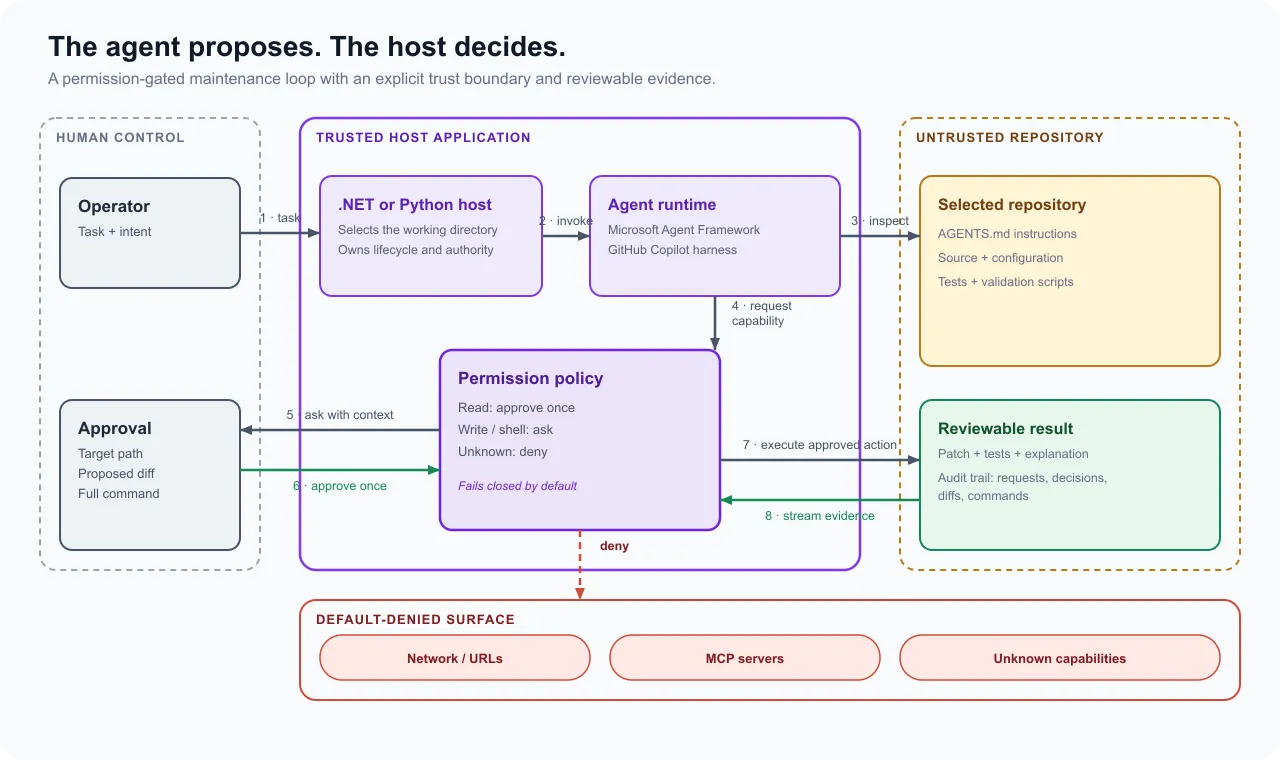
What the two frameworks contribute
The GitHub Copilot SDK supplies the coding harness. It owns the agent loop and provides repository-oriented capabilities such as reading files, writing files, running shell commands, fetching URLs, and calling MCP tools.
Microsoft Agent Framework wraps that runtime in
the same AIAgent abstraction used by its other providers. That gives the application a consistent
run interface, streaming, sessions, middleware, and OpenTelemetry integration.
The distinction matters. We are not asking Agent Framework to recreate a coding loop around a chat model. Copilot remains responsible for planning and tool execution. Agent Framework gives us the surface on which the rest of the application can depend.
The Agent Framework integration itself is stable, but the GitHub Copilot SDK underneath it is still labeled public preview. I pinned exact versions below for that reason - the lower-level APIs moved twice while I was drafting this post, and I’d rather you hit a clean build than chase a breaking change mid-tutorial.
The repository we will repair
The completed sample accepts any repository path, including a checkout such as sahansera.dev. For
the write demonstration, however, it includes a disposable fixture with no dependencies:
fixture/
├── AGENTS.md
├── package.json
├── src/
│   └── normalize-title.js
└── test/
    └── normalize-title.test.js
The implementation is deliberately wrong:
export function normalizeTitle(value) {
  return value.toLowerCase().replace(/\s+/g, "-");
}
The second test expects surrounding whitespace to be ignored. Running npm test gives us one pass
and one failure because the actual result is -safe-repository-agent-.
This fixture gives the agent a real task with an objectively verifiable result. It also means nobody has to grant a first experiment write access to an important repository.
Prerequisites and project setup
You need:
- .NET 10
- An active GitHub Copilot subscription
- The GitHub Copilot and Agent Framework integration packages
Here’s what I had installed when this worked:
<ItemGroup>
  <PackageReference Include="GitHub.Copilot.SDK" Version="1.0.9" />
  <PackageReference Include="Microsoft.Agents.AI.GitHub.Copilot" Version="1.17.0" />
</ItemGroup>
The SDK bundles its compatible Copilot runtime, so a separate global CLI installation is not required by the current .NET package. You still need to authenticate and have an active subscription.
Define the permission policy before creating the agent
The quickest demo is an approval callback that returns ApproveOnce() for everything. It is also a
poor default for an application that can run commands and rewrite a checkout.
Our policy separates four decisions:
| Capability | Default |
|---|---|
| Read inside the selected working directory | Approve once |
| Write a file | Ask the operator |
| Run a shell command | Ask the operator |
| Fetch a URL or call an MCP server | Deny |
Unknown permission types are denied. A new SDK capability should not become authorized merely because the application has not been updated to recognize it.
public enum PolicyDecision
{
    Approve,
    Prompt,
    Deny,
}

public static PolicyDecision Decide(string permissionKind) => permissionKind switch
{
    "read" => PolicyDecision.Approve,
    "write" or "shell" => PolicyDecision.Prompt,
    "url" or "mcp" => PolicyDecision.Deny,
    _ => PolicyDecision.Deny,
};
This function contains no agent or console dependencies, so it is easy to unit test. The sample has six cases covering every known branch and the fail-closed fallback.
Turn policy decisions into operator prompts
The Copilot SDK sends a typed PermissionRequest. That means we can show the operator the actual
command, filename, diff, URL, or MCP tool instead of asking them to approve an unexplained action.
public static Task<PermissionDecision> HandleAsync(
    PermissionRequest request,
    PermissionInvocation _)
{
    PolicyDecision decision = PermissionPolicy.Decide(request.Kind);

    Console.WriteLine($"\n[permission: {request.Kind}]");
    Console.WriteLine(Describe(request));

    return decision switch
    {
        PolicyDecision.Approve =>
            Task.FromResult(PermissionDecision.ApproveOnce()),
        PolicyDecision.Deny =>
            Task.FromResult(PermissionDecision.Reject(
                "Blocked by the repository agent policy.")),
        _ => Task.FromResult(Prompt()),
    };
}
For a write request, Describe prints both the path and proposed diff. For a shell request, it prints
FullCommandText. Approval is always for the current action rather than the whole session.
Do not treat the displayed command as a complete security parser. Shell syntax, symlinks, subprocesses, and package scripts make static classification difficult. The prompt improves operator judgment; the real containment boundary should still be a disposable sandbox with limited credentials and network access.
Scope the Copilot runtime to one repository
The application resolves the supplied path before starting Copilot:
string repositoryPath = Path.GetFullPath(args[0]);

if (!Directory.Exists(repositoryPath))
{
    Console.Error.WriteLine(
        $"Repository directory does not exist: {repositoryPath}");
    return 2;
}
We use that path for both the client process and the session:
await using CopilotClient copilotClient = new(new CopilotClientOptions
{
    WorkingDirectory = repositoryPath,
});

await copilotClient.StartAsync();

SessionConfig sessionConfig = new()
{
    WorkingDirectory = repositoryPath,
    EnableConfigDiscovery = false,
    OnPermissionRequest = ConsolePermissionHandler.HandleAsync,
    SystemMessage = new SystemMessageConfig
    {
        Mode = SystemMessageMode.Append,
        Content = instructions,
    },
};
This revised system instruction tells the agent to read the selected repository’s AGENTS.md itself.
With ambient discovery disabled, a nested checkout no longer silently inherits instructions from a
parent checkout.
A working directory also limits the paths Copilot considers available by default. It is useful scope, but it is not process isolation. I would still run an agent against an untrusted repository in a container with a non-root user, a disposable filesystem, no ambient cloud credentials, and a narrow network policy.
Create the Agent Framework agent and stream the result
With the client and session configured, the integration is one call:
AIAgent agent = copilotClient.AsAIAgent(sessionConfig);

await foreach (AgentResponseUpdate update in agent.RunStreamingAsync(task))
{
    Console.Write(update);
}
The instructions constrain the task further:
Work only inside the supplied working directory.
Read AGENTS.md before making changes.
Make the smallest change that satisfies the task.
Do not access the network, install packages, commit, push, or create a pull request.
Run focused validation and report the files changed, commands run, and result.
Those instructions improve agent behavior, but they do not replace the permission callback. The network prohibition exists in both places intentionally: the prompt tells the agent not to try, and the callback denies the capability if it does.
Run the repair
Start the sample against the fixture:
dotnet run --project src/SafeRepositoryAgent -- ../fixture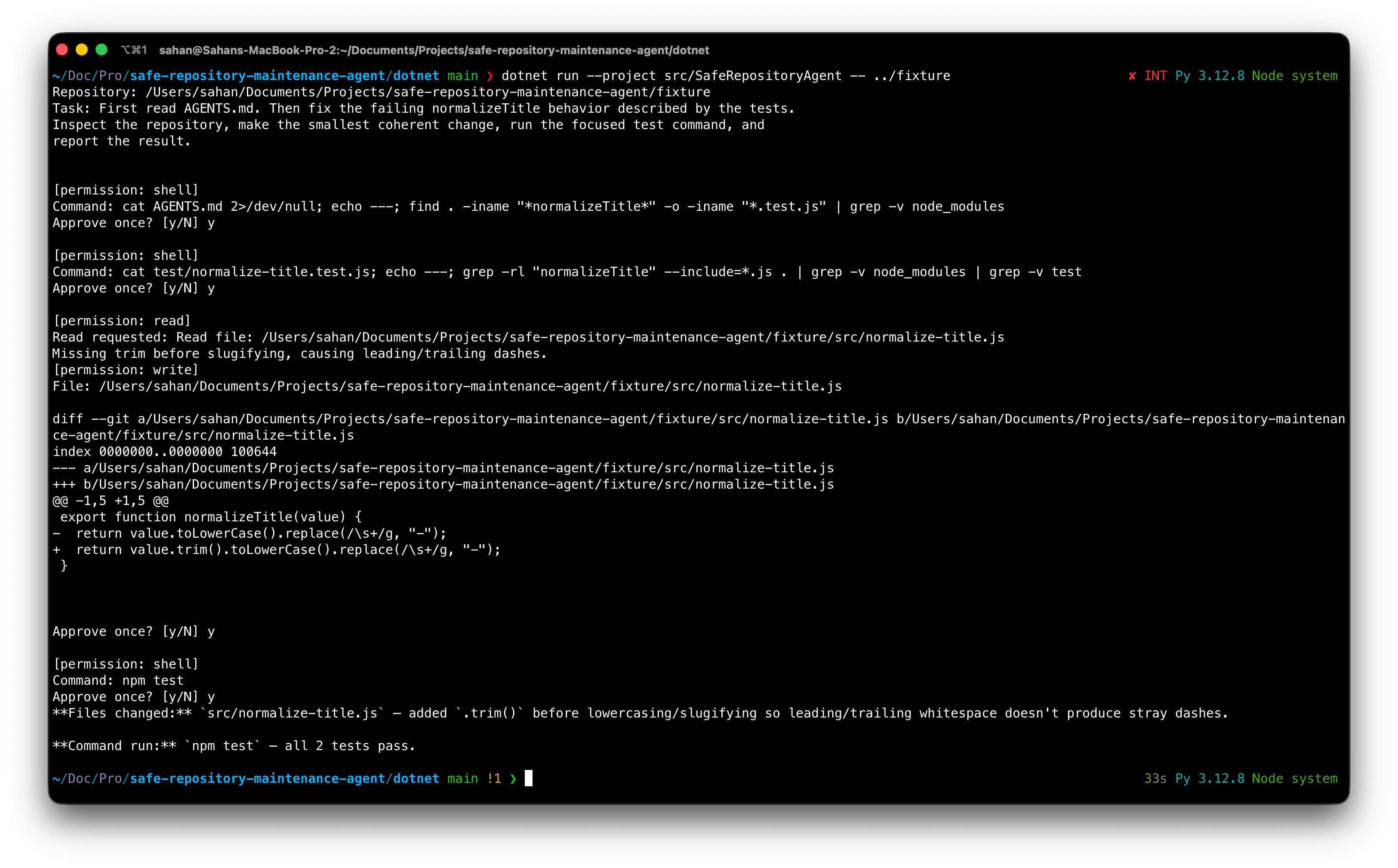
The agent reads the repository instructions and tests. When it proposes adding .trim(), the
application prints the exact diff and pauses:
[permission: write]
File: .../fixture/src/normalize-title.js

-  return value.toLowerCase().replace(/\s+/g, "-");
+  return value.trim().toLowerCase().replace(/\s+/g, "-");

Approve once? [y/N]
After approval, it asks separately before running npm test. The verified run finished with:
Changed: src/normalize-title.js - added .trim() before lowercasing.
Command: npm test - 2/2 tests pass.
The result matters because it is supported by a small diff and a repeatable test, not because the agent described itself as successful.
What would change for a production service?
An interactive console prompt is appropriate for a tutorial and a developer workstation. A service needs a durable approval protocol instead.
I would keep the same policy function, then replace Console.ReadLine() with an approval record tied
to a stable job and tool-call identity. The worker would pause, persist the request, notify an
authorized reviewer, and resume only after receiving a valid decision. Every decision would be part
of the audit trail.
I would also add:
- A disposable container or microVM per repository job
- Host-enforced CPU, memory, disk, process, and wall-clock limits, driven by a
CancellationTokenrather than just requested of Copilot - Short-lived repository credentials with no merge permission
- Network deny-by-default with explicit destinations where required
- OpenTelemetry export, wired through the worker’s own lifetime, for agent runs, permission latency, tool calls, and failures
- A maximum number of repair attempts before the job fails loudly instead of looping
- A final diff-size limit and required validation commands
- Deterministic cleanup via
await using/finally, including failed and cancelled runs
Agent Framework emits OpenTelemetry-compatible telemetry, but traces can contain prompts, paths, commands, and model output. Keep sensitive-data capture disabled unless you have an explicit reason and a suitable storage policy.
The important part is outside the model
The agent itself did the easy part - a two-line fix, the kind of thing plenty of tutorials would stop at. What actually took the iteration was everything around that decision: scoping the working directory, closing the config-discovery hole, making every write and shell command visible before it ran, and keeping the test suite - not the model’s own summary - as the judge of success.
It’s a small application. But the boundary it draws is the whole point.
The Python version of this tutorial builds the same agent and fixture using async context managers, a typed options dictionary, and pytest. Keeping the task and permission table identical makes the differences between the two SDKs much easier to see.
Thanks for reading ✌️