Streaming APIs with FastAPI and Next.js - Part 1
Updated · originally #python#fastapi#nextjs#streaming6 min read
Streaming data in the browser is one of those things that feels magical the first time you see it: data appears live - no need to wait for the full response body. In this two-part series, we’ll build a small full-stack app that uses FastAPI to stream text and a Next.js frontend to consume and render it incrementally.
💡 Code Repository: All the code for this post is available on GitHub. Feel free to explore, clone, and experiment with it!
There are many ways to stream data in the browser, from WebSockets to Server-Sent Events (SSE). This post uses a streaming HTTP response exposed through the browser’s ReadableStream API. Under HTTP/1.1, a server may frame a response of unknown length with chunked transfer encoding. HTTP/2 and HTTP/3 use different framing, but the frontend code still reads the response body as a stream.
If you want the HTTP/1.1 mechanics first, read HTTP Chunked Transfer Encoding Explained with curl.
If you are interested in learning about WebSockets, check out Understanding the WebSocket Protocol with ASP.NET Core. It’s targeted at .NET developers, but the protocol concepts carry across stacks. The focus here is an HTTP response stream, not a WebSocket connection.
This post focuses on the frontend bit. In Part 2, we’ll dive into building the FastAPI backend.
🔧 The Setup
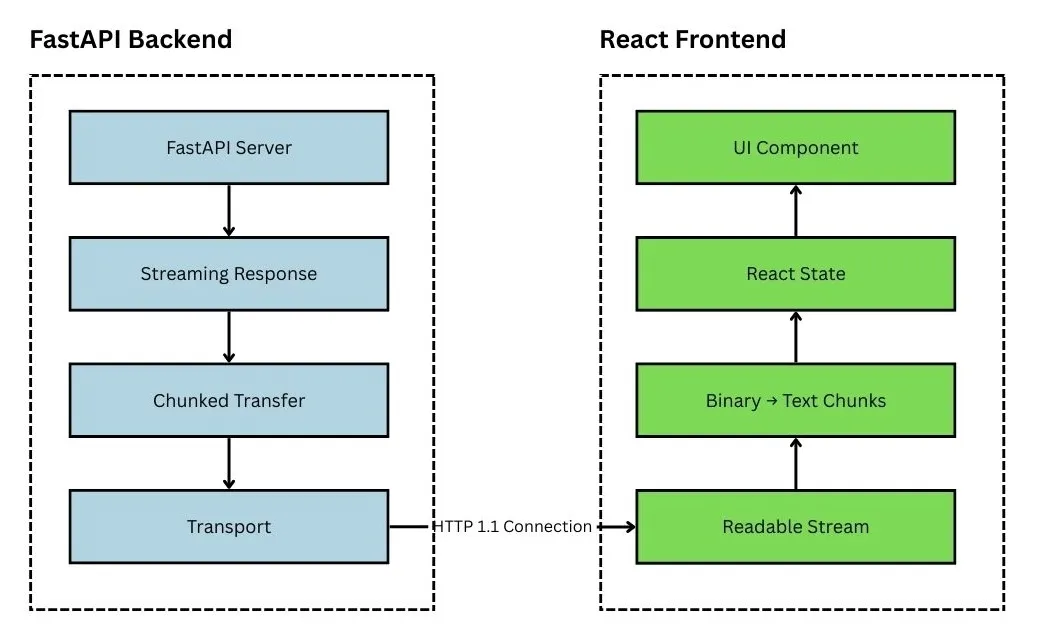
Let’s say you have a streaming API running locally at:
http://localhost:8000/streamThis endpoint sends back a stream of text data - think server logs, chat messages, or real-time updates. The goal is to connect to this endpoint from a React component and display data as it arrives.
Here’s a simplified version of the key parts of our React component (index.tsx):
// Key imports
import { useEffect, useState, useCallback } from "react";

export default function IndexPage() {
  const [dataChunks, setDataChunks] = useState<{ timestamp: string; log: string }[]>([]);
  const [isLoading, setIsLoading] = useState(true);
  const [error, setError] = useState<string | null>(null);

  const fetchStream = useCallback(async (signal: AbortSignal) => {
    // Reset state
    setIsLoading(true);
    setError(null);
    setDataChunks([]);

    try {
      // 1. Connect to the stream
      const response = await fetch("http://localhost:8000/stream", { signal });

      if (!response.ok || !response.body) {
        throw new Error(`Stream connection failed`);
      }

      // 2. Get a reader from the stream
      const reader = response.body.getReader();
      const decoder = new TextDecoder("utf-8");

      // 3. Read chunks until done
      while (true) {
        const { value, done } = await reader.read();

        if (done) {
          const finalChunk = decoder.decode();
          if (finalChunk) {
            setDataChunks((prev) => [
              ...prev,
              { timestamp: new Date().toLocaleTimeString(), log: finalChunk }
            ]);
          }
          break;
        }

        // 4. Decode and update UI with each chunk
        const chunk = decoder.decode(value, { stream: true });
        if (chunk) {
          setDataChunks((prev) => [
            ...prev,
            { timestamp: new Date().toLocaleTimeString(), log: chunk }
          ]);
        }
      }

      setIsLoading(false);

    } catch (error) {
      if (error instanceof DOMException && error.name === "AbortError") return;
      setError(error instanceof Error ? error.message : String(error));
      setIsLoading(false);
    }
  }, []);

  // Connect to stream on component mount
  useEffect(() => {
    const controller = new AbortController();
    fetchStream(controller.signal);

    return () => controller.abort();
  }, [fetchStream]);

  // Rendering components (simplified)
  return (
    <div>
      <h1>Server Log Viewer</h1>
      {/* Error handling and rendering of streamed data */}
      {/* See full code on GitHub */}
    </div>
  );
}- Own the stream state. The component keeps the received data, loading state, and connection error together. Each new connection resets the previous result before reading starts.
- Open and validate the response. The request receives an abort signal, rejects unsuccessful or body-less responses, then creates a byte reader and UTF-8 decoder.
- Finish the decoder cleanly. When the reader reports completion, the final decode flushes any buffered UTF-8 bytes before the loop exits.
- Decode each incremental read. Streaming mode preserves a multibyte character split across reads, and each non-empty decoded value is appended to the UI state.
- Separate cancellation from failure. A deliberate abort ends quietly. Other failures become visible error state and stop the loading indicator.
- Bind the connection to the effect. The effect creates the controller, starts the stream, and aborts the request during cleanup so remounts and navigation do not leak a connection.
🧠 What’s Really Happening?
Let’s break this down and understand the key concepts behind streaming in the browser:
1. Fetching the Stream
const response = await fetch("http://localhost:8000/stream");fetch() resolves after the response headers are available. Reading response.body gives you a ReadableStream so you can process bytes incrementally. Convenience methods such as response.text() and response.json() read the body to completion before resolving.
2. Getting a Reader
const reader = response.body.getReader();This gives us a ReadableStreamDefaultReader, which lets us manually pull chunks of data from the response. This is part of the Streams API, now supported in all major browsers.
3. Reading Chunks
const { value, done } = await reader.read();value: aUint8Arrayrepresenting a chunk of binary data.done:truewhen the stream is finished.
We loop until done becomes true. A value returned by reader.read() is a browser stream chunk, not necessarily one server message or one server-side yield. Network and buffering layers can split or combine writes.
4. Decoding the Text
const decoder = new TextDecoder("utf-8");
const chunk = decoder.decode(value, { stream: true });
Streaming responses may split characters across chunks, especially for multi-byte encodings like UTF-8. Passing { stream: true } tells TextDecoder to retain an incomplete character for the next call. Calling decoder.decode() once more when the reader finishes flushes any remaining decoder state.
5. Updating the UI
setDataChunks((prev) => [
  ...prev,
  { timestamp: new Date().toLocaleTimeString(), log: chunk }
]);
We append each decoded chunk to our state array. React re-renders the component with every update, giving us that real-time feel.
For a real log or JSON Lines protocol, keep a text buffer and split complete records on the delimiter. Do not treat reader.read() boundaries as record boundaries. If the stream is busy, batch state updates so network activity does not cause a render for every small chunk.
6. One-Time Effect
useEffect(() => {
  const controller = new AbortController();
  fetchStream(controller.signal);
  return () => controller.abort();
}, [fetchStream]);
The effect opens the connection and its cleanup aborts the request when the component unmounts or the effect restarts. That cleanup also makes the code safe under React Strict Mode’s extra development setup-and-cleanup cycle.
✅ Recap
With just a few lines of code, we’ve created a streaming experience in the browser using modern Web APIs. The key things were:
fetch()with a streaming responseReadableStream+ streaming UTF-8 decoding- Updating React state to progressively display data
- Cancelling the request during effect cleanup
In Part 2, we’ll build the FastAPI backend that powers this stream and inspect how StreamingResponse produces incremental response data.
💡 Gotchas to Watch Out For
- CORS: Configure your FastAPI server for the exact frontend origins that need access.
- Buffering: The server, compression middleware, reverse proxy, CDN, or browser can buffer writes. Test the complete deployed path, not only localhost.
- Message boundaries: Define a delimiter or framing format because a browser chunk is not an application record.
- Cleanup: Abort the long-running fetch in
useEffectcleanup so navigation and remounts do not leave connections open.