Streaming APIs with FastAPI and Next.js - Part 2
Updated · originally #python#fastapi#nextjs#streaming5 min read
FastAPI’s StreamingResponse accepts an async generator or a normal iterator and sends its output without first building the entire response in memory. In this example, a synchronous Python generator tails a log file while the Next.js frontend from Part 1 reads the response incrementally.
The important boundary is that a generator yield is an application-level write, not a guaranteed network chunk. Uvicorn, HTTP framing, reverse proxies, and clients can buffer or combine writes. We’ll build the endpoint, inspect it with curl --no-buffer, and connect it to the frontend.
💡 Code Repository: The complete code is available on GitHub. You can clone it and run it locally to follow along.
🛠️ Building the Streaming Backend with FastAPI
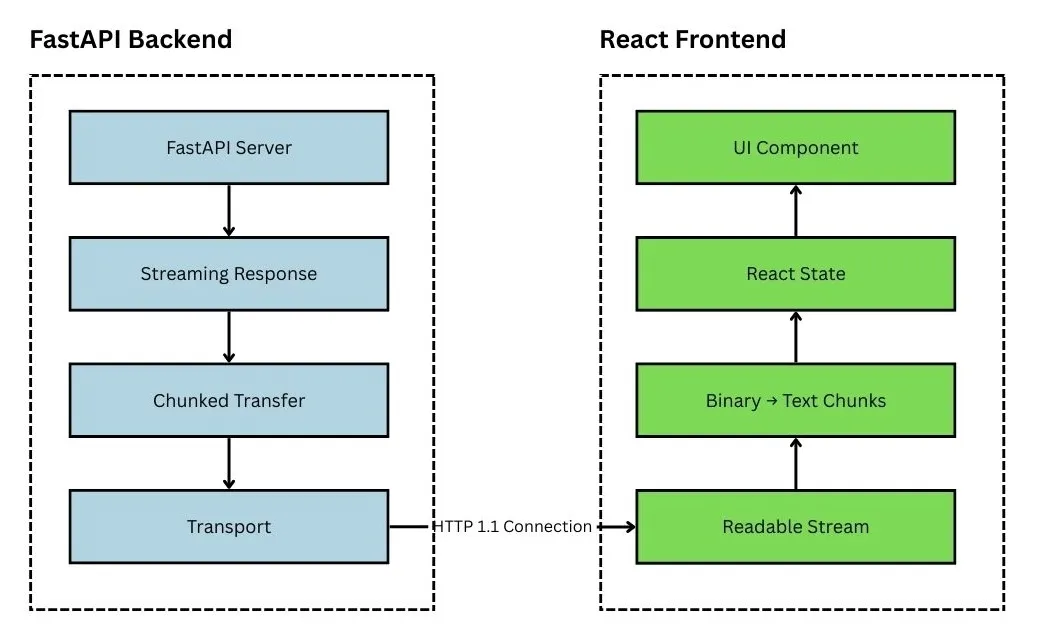
FastAPI provides StreamingResponse through fastapi.responses.
Let’s build a /stream endpoint in index.py that simulates real-time data like server logs or chat messages.
🚀 Simulating a Real-Time Log Stream
Here’s a minimal FastAPI app with a streaming endpoint:
# backend/index.py
from typing import Any, Generator

from fastapi import FastAPI
from fastapi.responses import StreamingResponse
from fastapi.middleware.cors import CORSMiddleware
import time
import os
import uvicorn  # Import uvicorn for running the server
import threading

app = FastAPI()

# Add CORS middleware to allow cross-origin requests
# ...

LOG_FILE_PATH = "logs/server.log"

def log_stream(log_file_path: str) -> Generator[str, None, None]:
    try:
        with open(log_file_path, "r") as log_file:
            # Move to the end of the file
            _ = log_file.seek(0, os.SEEK_END)
            while True:
                line = log_file.readline()
                if line:
                    yield line
                else:
                    yield "Waiting for new log entries...\n"  # Heartbeat message
                    time.sleep(1)  # Wait for new lines to be written
    except FileNotFoundError:
        yield "Log file not found.\n"
    except Exception as e:
        yield f"Error reading log file: {str(e)}\n"


def simulate_log_generation():
    """Simulate log entries being written to the log file."""
    while True:
        with open(LOG_FILE_PATH, "a") as log_file:
            log_file.write(f"Simulated log entry at {time.ctime()}\n")
        time.sleep(5)  # Write a new log entry every 5 seconds


@app.on_event("startup")
def start_log_simulation():
    """Start the log simulation in a background thread."""
    threading.Thread(target=simulate_log_generation, daemon=True).start()


@app.get("/stream")
def stream():
    return StreamingResponse(log_stream(LOG_FILE_PATH), media_type="text/plain")
🧠 How It Works
Let’s break it down:
1. Synchronous Generator
def log_stream(log_file_path: str) -> Generator[str, None, None]:
    try:
        with open(log_file_path, "r") as log_file:
            _ = log_file.seek(0, os.SEEK_END)
            while True:
                line = log_file.readline()
                if line:
                    yield line
                else:
                    yield "Waiting for new log entries...\n"
                    time.sleep(1)
    except FileNotFoundError:
        yield "Log file not found.\n"
    except Exception as e:
        yield f"Error reading log file: {str(e)}\n"
The synchronous generator produces the next piece of response-body data whenever it reaches yield. StreamingResponse consumes the iterator as data becomes available.
A yielded value is not guaranteed to arrive as one network chunk. The ASGI server, HTTP stack, proxy, or client can combine or buffer multiple writes. The time.sleep(1) in this demonstration prevents a tight polling loop while it waits for another log line.
2. StreamingResponse
StreamingResponse(log_stream(LOG_FILE_PATH), media_type="text/plain")StreamingResponse returns data as the iterator produces it rather than collecting the complete body first. The media_type tells the client that this stream contains plain text.
⚙️ Running the Server
To run the server:
make start-backendThen hit:
http://localhost:8000/stream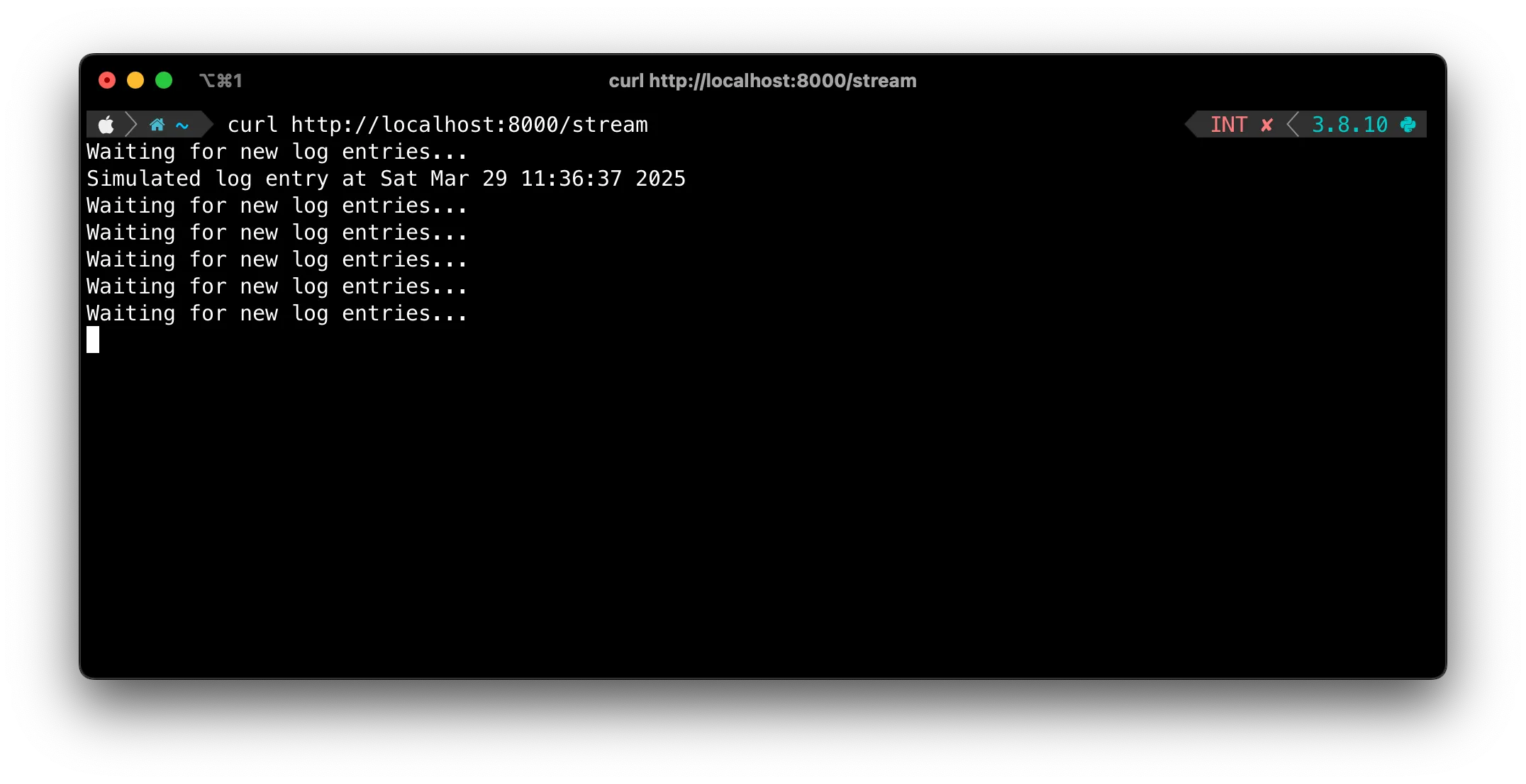
You should see new log lines appear as the generator produces them. A browser may buffer the display, so use the curl command below when you need to inspect delivery timing.
💡 Tips for Production
✅ Keep the Stream Alive
In a real app, your data stream might be longer-running. Our example already implements this with a heartbeat:
if line:
    yield line
else:
    yield "Waiting for new log entries...\n"  # Heartbeat message
    time.sleep(1)  # Wait for new lines to be written
The heartbeat creates regular application data while no log entries are available. In production, choose an interval that fits the idle timeouts in your server, proxy, and load balancer.
🧹 Handle Disconnects Gracefully
Long-lived streams need explicit cleanup. Put open files, subscriptions, and other resources inside try/finally blocks so they are released when iteration stops or the request is cancelled. A synchronous generator is convenient for this blocking file example, but every open stream still consumes server resources, so test it at the concurrency you expect.
If several messages arrive in a burst, find the buffering layer before changing the generator. Check the application, ASGI server, compression middleware, reverse proxy or CDN, and client. Response headers alone do not guarantee that every intermediary forwards each write immediately.
For a closer look at HTTP/1.1 framing, see HTTP Chunked Transfer Encoding Explained with curl.
🔐 Secure Your Stream
- Add authentication if you’re streaming sensitive data.
- Rate-limit the endpoint to avoid abuse.
🧪 Testing with Curl
You can test the streaming endpoint with:
curl --no-buffer http://localhost:8000/streamThe --no-buffer option, also available as -N, disables curl’s output buffering. It makes incremental output easier to observe, although other parts of the request path may still buffer data.
🔗 Hooking it up with the Frontend
Now that our backend is streaming correctly, the frontend from Part 1 will handle it smoothly:
const response = await fetch("http://localhost:8000/stream");
const reader = response.body.getReader();
// ...
The reader receives bytes as they become available and can update the React UI incrementally. Do not assume that each reader.read() call maps to one server-side yield; split or combine records using an explicit delimiter such as a newline.
🧠 Recap
This example builds a small end-to-end streaming path:
- Built a synchronous generator to simulate streaming logs
- Used
StreamingResponseto consume the generator without buffering the entire body - Connected it to our frontend from Part 1
Together, the backend and frontend form a useful starting point for log viewers and dashboards. Production systems also need bounded resource usage, disconnect cleanup, authentication, and buffering tests across the full request path.
🧱 Next Steps
- 🔌 Add dynamic data (e.g. logs from a file or DB)
- 📦 Stream structured data (like JSON Lines)
- 📈 Use this setup for real-time dashboards or log viewers
🛠️ Useful Links
If you enjoyed this series, feel free to star the repo ⭐ or share it with a friend. Got ideas or feedback? Hit me up on Twitter or drop an issue in the GitHub repo.
Happy streaming! 🚀